# Plugin Screen Generation Flow

<figure><img src="/files/TcZ3G6rbyq1RnYmU4hny" alt=""><figcaption></figcaption></figure>

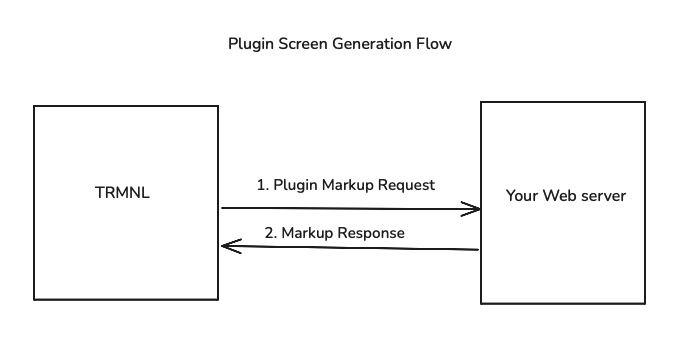
TRMNL generates a screen every X minutes, where X is the refresh frequency set by the user.

TRMNL generates screens by sending a POST request to the `plugin_markup_url` endpoint you specified during [Plugin Creation](/go/plugin-marketplace/plugin-creation.md). The request body will include the `user_uuid` (that particular user's plugin connection UUID) and some metadata. The request header contains an `authorization` key with the user's plugin connection `access_token`as the Bearer token. Here's an example of our server request:

```bash
curl -XPOST 'https://your-server.com/your-markup-url' \
-H 'Authorization: Bearer xxx' \
-H 'Content-Type: application/x-www-form-urlencoded' \
-d 'user_uuid=xx&trmnl=<metadata-object>'
```

The `trmnl` object in this payload may or may not be useful for your plugin, but includes the user-defined instance name, device dimensions, user timezone, and so on. Here's an example, subject to change:

```json
{
  "user": {
    "name": "Jim Bob",
    "first_name": "Jim",
    "last_name": "Bob",
    "locale": "en",
    "time_zone": "Eastern Time (US & Canada)",
    "time_zone_iana": "America/New_York",
    "utc_offset": -14400
  },
  "device": {
    "friendly_id": "XXXXXX",
    "percent_charged": 74.17,
    "wifi_strength": 50,
    "height": 480,
    "width": 800
  },
  "system": {
    "timestamp_utc": 1747596567
  },
  "plugin_settings": {
    "instance_name": "Upcoming Assignments"
  }
}
```

Your web server should respond with HTML inside root nodes named `markup`, `markup_quadrant`, and so on to satisfy each layout offered by TRMNL. This markup should include whatever values you want the user to see rendered on their screen.

{% hint style="success" %}
**Pro tip**: use the [Private Plugin](https://trmnl.com/plugin_settings/new?keyname=private_plugin) markup editor to develop the frontend of your plugin. This in-browser text editor supports live refresh and automatically applies the correct styling and JavaScript helpers to your markup.
{% endhint %}

TRMNL uses the markup in your server's response to generate an e-ink friendly image. If the user connecting your plugin created a "full screen" playlist item, TRMNL will leverage the HTML inside the `markup` node. If they connected your plugin as part of a left/right Mashup, TRMNL will look for HTML inside the `markup_half_vertical` node.

Here's an example of a valid server response:

```json
{
   "markup":"<div class=\"view view--full\"><div class=\"layout\"><div class=\"columns\"><div class=\"column\"><div class=\"markdown gap--large\"><span class=\"title\">Daily Scripture</span><div class=\"content-element content content--center\">Hello</div><span class=\"label label--underline mt-4\">World</span></div></div></div></div><div>",
   "markup_half_horizontal":"<div class=\"view view--half_horizontal\">Your content</div>",
   "markup_half_vertical":"<div class=\"view view--half_vertical\">Your content</div>",
   "markup_quadrant":"<div class=\"view view--quadrant\">Your content</div>",
   "shared":""
}
```

**Note:** in order for your plugin to be published in the TRMNL public marketplace, you must provide HTML for all available markup layouts. [View them here](https://help.trmnl.com/en/articles/10168132-mashups).

---

# Agent Instructions: Querying This Documentation

If you need additional information that is not directly available in this page, you can query the documentation dynamically by asking a question.

Perform an HTTP GET request on the current page URL with the `ask` query parameter:

```
GET https://docs.trmnl.com/go/plugin-marketplace/plugin-screen-generation-flow.md?ask=<question>
```

The question should be specific, self-contained, and written in natural language.
The response will contain a direct answer to the question and relevant excerpts and sources from the documentation.

Use this mechanism when the answer is not explicitly present in the current page, you need clarification or additional context, or you want to retrieve related documentation sections.
