> For the complete documentation index, see [llms.txt](https://docs.trmnl.com/go/llms.txt). Markdown versions of documentation pages are available by appending `.md` to page URLs; this page is available as [Markdown](https://docs.trmnl.com/go/private-plugins/webhooks.md).
# Webhooks
Send a payload of merge variables to create a custom screen.
{% hint style="info" %}
#### Before you begin
Learn how to build Private Plugins [here](https://help.trmnl.com/en/articles/9510536-private-plugins). The guide below only explains how to use the "Webhook" data retrieval strategy.
{% endhint %}
### Rate Limits
*Request volume*
You may send data to TRMNL's server up to 12x per hour. [TRMNL+](https://help.trmnl.com/en/articles/11861887-trmnl-faq) subscribers may send up to 30x payloads per hour. Webhooks sent at a faster pace will receive a `429` rate limit response. To temporarily increase your rate limit during development, enable "Debug Logs" on your plugin settings page -- this unlocks the TRMNL+ limit for 24 hours.
*Request size*
You may send up to 5kb of data. [TRMNL+](https://help.trmnl.com/en/articles/11861887-trmnl-faq) subscribers may send up to 10kb of data. Larger payloads receive a `422` response with the size we measured. To stay within these boundaries while also creating a data rich experience, consider using the `deep_merge` and `stream` strategies documented below.
Need to send something bigger, like a raw API response you only use a slice of? Attach a [Serverless](https://help.trmnl.com/en/articles/14130649-serverless) transform script in the Markup Editor. Webhooks with a transform accept up to 1mb, and the transformed result must fit the limits above.
### Authorization
TRMNL has Device API Keys, User API Keys, and Plugin Setting UUIDs. For private plugin screen generation, we'll use your Plugin Settings UUID.
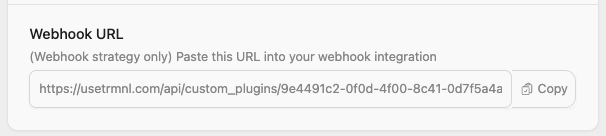
This is accessible from your plugin instance's configuration form > Webhook URL field.
Private Plugin Webhook URL w/ UUID
{% hint style="info" %}
**Note:** you must "save" (create) a private plugin instance to generate a UUID and Webhook URL. The plugin's Strategy must be set to "Webhook", and the account must own a device with [Developer edition](https://help.trmnl.com/en/articles/12410549-developer-edition-features) enabled -- otherwise we respond with `403`.
{% endhint %}
### Set new content
Send a `POST` request to your Webhook URL. Put data inside a `merge_variables` node like so:
```
curl "https://trmnl.com/api/custom_plugins/asdfqwerty1234" \
-H "Content-Type: application/json" \
-d '{"merge_variables": {"text":"You can do it!", "author": "Rob Schneider"}}' \
-X POST
```
We respond with JSON: `200` + the stored `merge_variables` on success, or `422` + a `message` explaining what was wrong (wrong strategy, payload too large, `merge_variables` not an object, unknown `merge_strategy`).
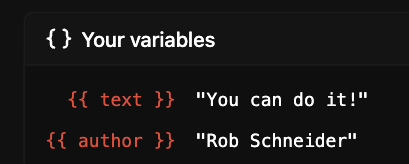
You will see this payload inside the Your Variables dropdown of the Markup Editor.
Your variables - available inside the Markup Editor
New data doesn't always render the instant it arrives. If your plugin hasn't refreshed in the last 15 minutes and no refresh is already queued, we render right away. Otherwise the new values show up on the next scheduled refresh.
**Tip:** send `"TRMNL_SKIP_DISPLAY": true` inside `merge_variables` to store the data without drawing a new screen, and to skip this plugin in your playlist until a later payload drops the flag.
#### MessagePack
Prefer a binary format? Send [MessagePack](https://msgpack.org) instead of JSON. Set `Content-Type: application/msgpack` and encode the same object (a map with string keys, e.g. `{"merge_variables": {...}}`). Size limits are measured on the stored JSON, so MessagePack saves bytes on the wire but not against your quota.
### Get merge variable content
To fetch existing `merge_variables` from a private plugin, `GET` from the same endpoint:
```
curl "https://trmnl.com/api/custom_plugins/asdfqwerty1234"
```
The response looks like `{"status": 200, "merge_variables": {...}}`.
### Update existing content
If your private plugin needs to maintain state over time, for example an ever-growing todo list or a data visualization, you may prefer to send only "new" data points to your TRMNL plugin.
There are two strategies to accomplish this: `deep_merge`, and `stream`.
#### Deep merge strategy
The `deep_merge` strategy combines existing key/value pairs with the new values incoming on the webhook. It's a good way to update nested data with only a few values here and there. Arrays are replaced, not combined -- use `stream` for that.
```
curl "https://trmnl.com/api/custom_plugins/asdfqwerty1234" \
-H "Content-Type: application/json" \
-d '{"merge_variables": {"sensor": {"temperature": 42}}, "merge_strategy": "deep_merge"}' \
-X POST
```
{% hint style="info" %}
**Note**: when using this strategy, [#rate-limits](#rate-limits "mention") (namely request size) still apply. New data will be merged with existing data and that payload must not exceed the maximum size.
{% endhint %}
#### Stream strategy
The `stream` strategy is useful for accumulating values in arrays. Any top-level arrays are appended with the incoming values, and the `stream_limit` parameter ensures that old values drop off the arrays so they don't grow forever. Without `stream_limit`, arrays keep growing until the payload hits your size limit.
**Every payload replaces the rest of your data.** Only the arrays you send again get appended to; any key you leave out of the next payload is gone, arrays included. Send every key, every time.
```
curl "https://trmnl.com/api/custom_plugins/asdfqwerty1234" \
-H "Content-Type: application/json" \
-d '{"merge_variables": {"temperatures": [40, 42]}, "merge_strategy": "stream", "stream_limit": 10}' \
-X POST
```
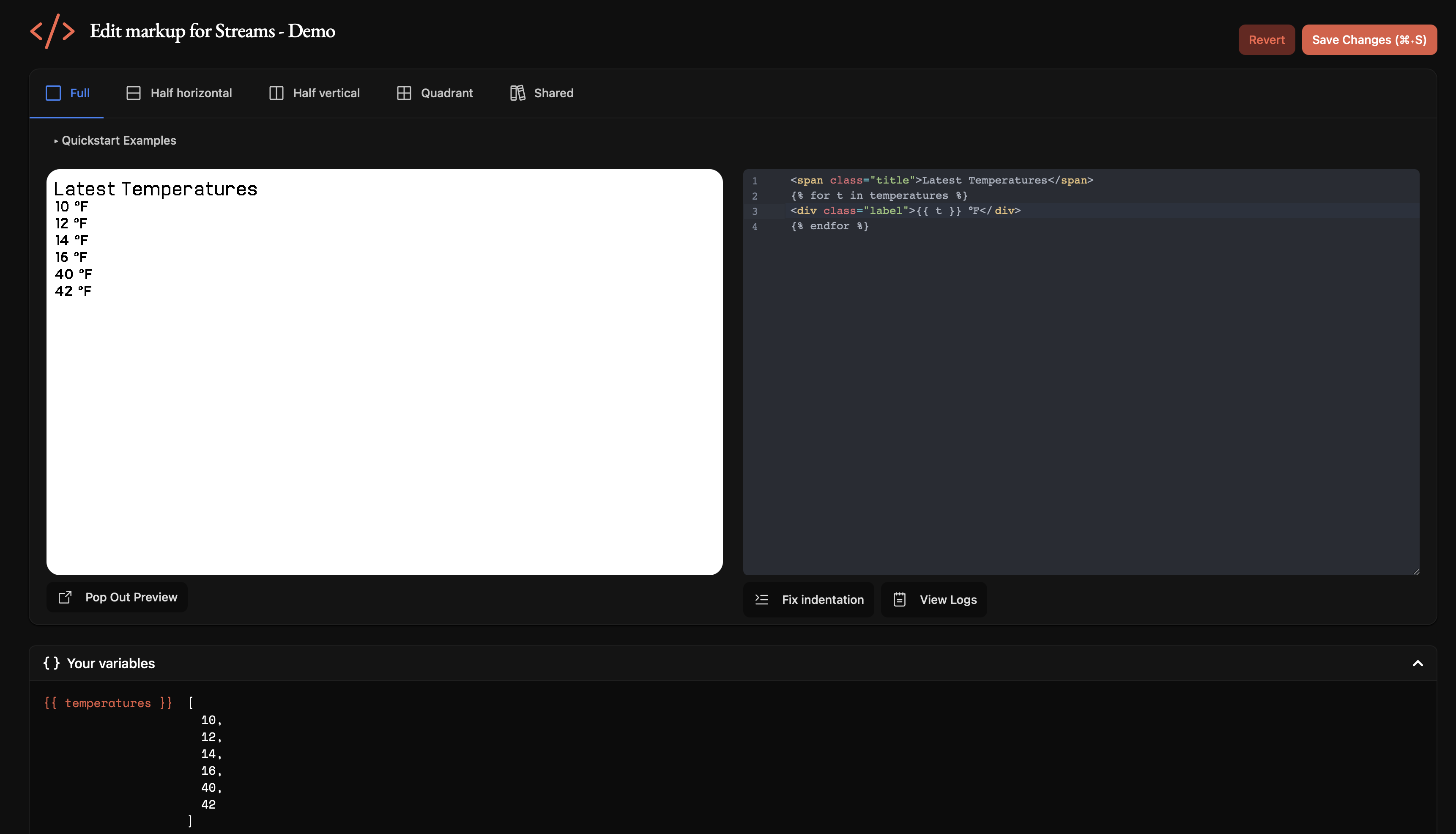
Now you may iterate through the combined data inside your markup, for example:
Accessing streamed webhook data
## Troubleshooting
For more help, see our [Private Plugin guide](https://help.trmnl.com/en/articles/9510536-custom-plugins) or join the developer Discord from your account tab.