> For the complete documentation index, see [llms.txt](https://docs.trmnl.com/go/llms.txt). Markdown versions of documentation pages are available by appending `.md` to page URLs; this page is available as [Markdown](https://docs.trmnl.com/go/diy/byod-s.md).
# BYOD/S
Bring your own device, and build your own server for the device to ping.
In the BYOD/S configuration, the only TRMNL IP is our [open source firmware](https://github.com/usetrmnl/trmnl-firmware).
### Device setup
See our [alternate screens](https://github.com/usetrmnl/#alternative-screens-and-clients) and [BYOD guide](/go/diy/byod.md) for instructions to jailbreak or build a device that's compatible with our firmware.
### Server quickstart
The TRMNL web server generates PNG images (BMP for the legacy OG model, WebP for a few color displays). When a device pings our [Display API](/go/private-api/screens.md), the next-in-queue image is shared as an absolute URL inside a JSON response like this:
```json
{
"status": 0,
"image_url": "https://your-server.local/screens/plugin-123.png",
"filename": "plugin-123.png",
"refresh_rate": 900,
"reset_firmware": false,
"update_firmware": false,
"firmware_url": "",
"special_function": "identify"
}
```
The firmware treats `filename` as a cache key -- if it already has a file by that name, it skips the download. Give every new image a new `filename`. `refresh_rate` is the number of seconds to sleep before the next ping.
For ready-made OSS server clients, see [BYOS Implementations](https://docs.trmnl.com/go/diy/byos#implementations). To develop your own server that is TRMNL firmware compatible out of the box:
1. [Build or jailbreak a device](/go/diy/byod.md)
2. Change the base URL to your own server or local network from the WiFi Captive Portal
3. Mimic the `api/setup` and `api/display` endpoints per our [firmware README](https://github.com/usetrmnl/trmnl-firmware#web-server-endpoints) + the [BYOS API minimum](/go/diy/byos.md#api)
4. Follow our [ImageMagick guide](/go/diy/imagemagick-guide.md) to create TRMNL firmware compatible images
5. Profit(?)
### Other infrastructure
In the quickstart above we glossed over a critical element: "next-in-queue" images.
At TRMNL we use a Playlists table to manage the ordering of plugin instances, letting users drag/drop different items in whatever sequence they prefer.
Drag/Drop Playlists UI
Each item in a Playlist is an *instance* of a Plugin, which we call a PluginSetting.
This keeps our Plugins table immutable, for example Google Calendar is just a name, icon, and form field parameters. Meanwhile details about a *connection* to Google Calendar are stored inside a PluginSetting record. Keep this in mind as you build your own server -- do you want to allow multiple connections to the same parent plugin?
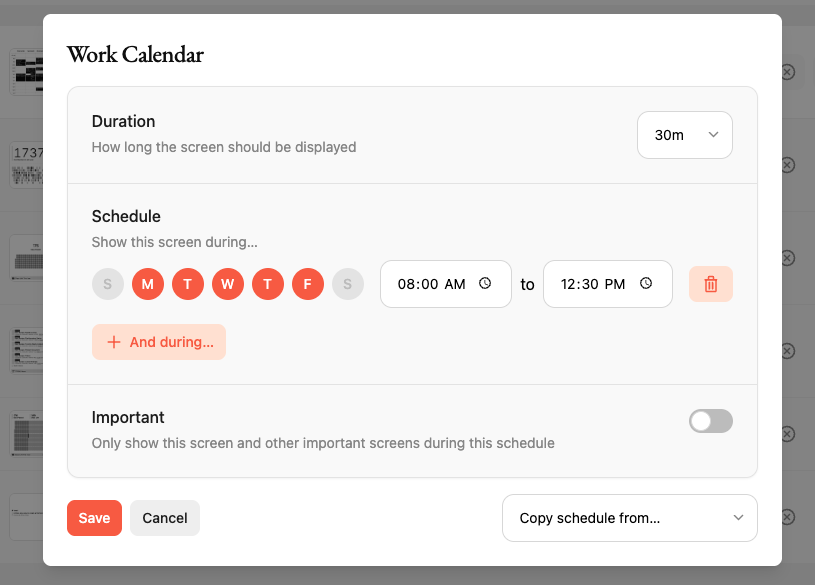
TRMNL also offers a [Scheduler](https://help.trmnl.com/en/articles/11663305-playlist-scheduler). This makes it easy to dictate conditions for when and why a given plugin is displayed on your device.
Playlist scheduler in action
Following our architecture is unnecessary for a self-hosted ePaper dashboard, but we do encourage you to check out those which have already been implemented in [BYOS clients](/go/diy/byos.md).