> For the complete documentation index, see [llms.txt](https://docs.trmnl.com/go/llms.txt). Markdown versions of documentation pages are available by appending `.md` to page URLs; this page is available as [Markdown](https://docs.trmnl.com/go/plugin-marketplace/plugin-screen-generation-flow.md).

# Plugin Screen Generation Flow

Creating image content to display on a user's device.

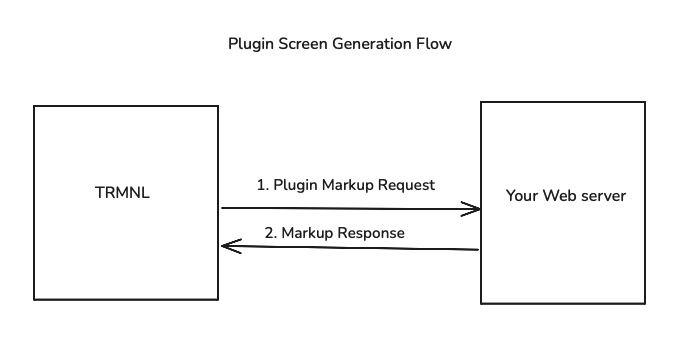
<figure><img src="https://1607647240-files.gitbook.io/~/files/v0/b/gitbook-x-prod.appspot.com/o/spaces%2FnXhDs1PQJ2VX7ppA91eY%2Fuploads%2Fgit-blob-dac900179a0eebadf6d74be009b878b86c080f15%2FScreenshot%202024-09-06%20at%203.35.01%20PM.png?alt=media" alt=""><figcaption></figcaption></figure>

TRMNL generates a screen every X minutes, where X is the refresh frequency set by the user -- never faster than the Supported Refresh Interval you chose during [Plugin Creation](/go/plugin-marketplace/plugin-creation.md). A user can also force a refresh by hand.

TRMNL generates screens by sending a POST request to the `plugin_markup_url` endpoint you specified during [Plugin Creation](/go/plugin-marketplace/plugin-creation.md). The request body will include the `user_uuid` (that particular user's plugin connection UUID) and some metadata. The request header contains an `authorization` key with the user's plugin connection `access_token` as the Bearer token. Here's an example of our server request:

```bash
curl -XPOST 'https://your-server.com/your-markup-url' \
-H 'Authorization: Bearer xxx' \
-H 'Content-Type: application/x-www-form-urlencoded' \
-d 'user_uuid=xx&trmnl[user][first_name]=Jim&trmnl[device][width]=800&trmnl[plugin_settings][instance_name]=Upcoming+Assignments'
```

The body is form-encoded, not JSON. The `trmnl` metadata arrives as nested bracket params (`trmnl[device][width]=800`), which Rails, PHP + Express (with `extended: true`) parse into a nested object for you.

The `trmnl` object in this payload may or may not be useful for your plugin, but includes the user-defined instance name, device dimensions, user timezone, and so on. `device` describes the first device with this instance in its playlist (or the user's first device if none). Here's an example, subject to change:

```json
{
  "user": {
    "id": 5678,
    "name": "Jim Bob",
    "first_name": "Jim",
    "last_name": "Bob",
    "locale": "en",
    "time_zone": "Eastern Time (US & Canada)",
    "time_zone_iana": "America/New_York",
    "utc_offset": -14400
  },
  "device": {
    "friendly_id": "XXXXXX",
    "percent_charged": 74.17,
    "wifi_strength": 50,
    "height": 480,
    "width": 800,
    "orientation": "landscape"
  },
  "system": {
    "timestamp_utc": 1747596567
  },
  "plugin_settings": {
    "instance_name": "Upcoming Assignments"
  }
}
```

We wait up to 10 seconds for your server. On a timeout or an empty body we pause briefly and try once more, then give up on that refresh. We follow up to 5 redirects, but drop the `Authorization` header on any redirect to a different host. Your markup URL must resolve to a public IP address -- `localhost` + private network addresses are refused, so use a tunnel while developing.

Your web server should respond with a JSON object whose keys are named `markup`, `markup_quadrant`, and so on to satisfy each layout offered by TRMNL. This markup should include whatever values you want the user to see rendered on their screen.

{% hint style="success" %}
**Pro tip**: use the [Private Plugin](https://trmnl.com/plugin_settings/new?keyname=private_plugin) markup editor to develop the frontend of your plugin. This in-browser text editor supports live refresh and automatically applies the correct styling and JavaScript helpers to your markup.
{% endhint %}

TRMNL uses the markup in your server's response to generate an e-ink friendly image. If the user connecting your plugin created a "full screen" playlist item, TRMNL will leverage the HTML inside the `markup` node. If they connected your plugin as part of a left/right Mashup, TRMNL will look for HTML inside the `markup_half_vertical` node.

TRMNL wraps each layout in its own `<div class="view view--full">` (or `view--half_horizontal`, etc), so start your markup at the `layout` element. A layout you leave out renders as "view not available."

Here's an example of a valid server response:

```json
{
   "markup":"<div class=\"layout\"><div class=\"columns\"><div class=\"column\"><div class=\"markdown gap--large\"><span class=\"title\">Daily Scripture</span><div class=\"content-element content content--center\">Hello</div><span class=\"label label--underline mt-4\">World</span></div></div></div></div>",
   "markup_half_horizontal":"<div class=\"layout\">Your content</div>",
   "markup_half_vertical":"<div class=\"layout\">Your content</div>",
   "markup_quadrant":"<div class=\"layout\">Your content</div>"
}
```

Every markup value is rendered as a [Liquid](https://help.trmnl.com/en/articles/10671186-liquid-101) template. Add an optional `merge_variables` object to your response and reference its keys in any layout, so you only build the data once:

```json
{
   "markup":"<div class=\"layout\"><span class=\"title\">{{ verse }}</span></div>",
   "markup_quadrant":"<div class=\"layout\"><span class=\"label\">{{ verse | truncate: 40 }}</span></div>",
   "merge_variables": { "verse": "Hello World" }
}
```

Only `merge_variables` is available to Liquid here -- the `trmnl` metadata we send you isn't. Since markup is always parsed as Liquid, escape any literal Liquid delimiters (double curly braces) in your HTML.

**Note:** in order for your plugin to be published in the TRMNL public marketplace, you must provide HTML for all available markup layouts. [View them here](https://help.trmnl.com/en/articles/10168132-mashups).